Showing posts with label ipad. Show all posts
Showing posts with label ipad. Show all posts
Adobe's New Photoshop Touch Apps for iPad
Today, Adobe announced upcoming apps and updates to Creative Suite all aligned with the iPad. Check out this video of Adobe Senior Vice President John Loiacono discussing the updates.
Read more on AllThingsD:
Adobe Recasts the iPad as High-Tech Palette for Photoshop
App Icons on iPad and iPhone

Technical Q&A QA1686: App Icons on iPad and iPhone
Great iPad Apps for Web Designers
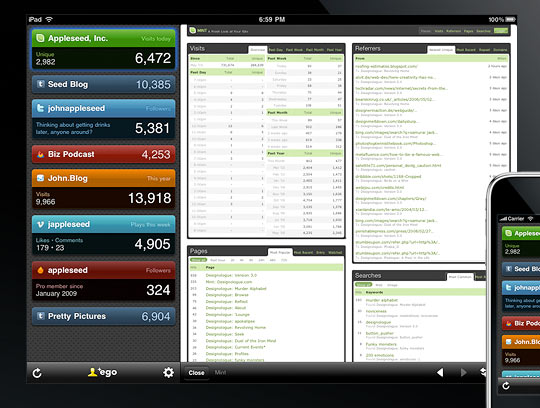
Here's a great collection of iPad apps for designers, including sketching tools, analytics, web development, and one of my favorites, Air Display, which turns your iPad into a second monitor. Great for OmniGraffle palettes:
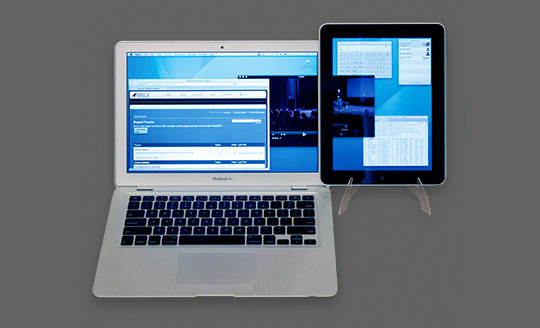
Read more:
10 Best iPad Apps for Web Designers | Tools
Sketching on the iPad with the iClooly Stylus
Review of the Korean stylus "iClooly":
Also, check out the iPad sketching group on Flickr:
Hat tip to Jeff!

Also, check out the iPad sketching group on Flickr:
Hat tip to Jeff!
modulR iPad case and iPad accessory system

Interesting and elegant modular system of accessories for the iPad. Scheduled to be released this summer.
World of Warcraft on the iPad?

Here's a bit of speculation for your Monday morning. PvP in the cloud, via software called Gaikai, or Photoshop hackery? You decide- enjoy!
Designing for the iPhone and iPad - A Collection of Pre-Built GUI Kits


If you are developing interfaces for the iPhone or iPad and are looking for pre-build GUI resources, check out this comprehensive collection from Speckyboy:
Designing for iPad: Reality Check

Are you designing apps for Apple's iPad? Check out this blog post from Information Architects.jp. They dig into typography, interaction design, the iPad's 3-dimensional elements and much more.
They also include a ton of interesting insights into what worked for them, what didn't, and some of the ways they experimented to get their UX right. Definitely worth checking out:
Mobile Interface Development Tools for Android, iPhone, iPad, Palm Pre

This is a great collection of on and offline tools for developing interfaces for mobile devices, including a Photoshop file for iPad applications. Enjoy!
Mobile Interface Development: Ultimate GUI Toolbox for Android, iPhone, iPad, Palm Pre | Coding | PelFusion.com
hat tip: InspiredMag and PelFusion.com
shared via AddThis.com
Could the iPad make reading easier?

Imagine if you were doing a bit of speed reading – skimming first and last sentences, paying attention to key words – and the text helped actually highlight the most important text as you scanned it.
What if supporting resources or rich media could be presented, based on what parts of the text you pay most attention?
For us interaction designers, imagine if it were much easier to obtain eye-tracking data for pages and sites as we designed them!
This kind of technology could add an additional layer of interaction context, significantly enriching the overall reading experience. The potential is pretty exciting; only time will tell where the technology could take us.
Eye-Tracking Tablets and the Promise of Text 2.0 | Epicenter | Wired.com
13 of the Brightest Tech Minds Sound Off on the Rise of the Tablet | Magazine

Its launch is imminent; will the iPad change how we interact with our world, or be just another computing device?
13 of the Brightest Tech Minds Sound Off on the Rise of the Tablet | Wired Magazine
Great products don't have to be good?

I've blogged a few times about focus and prioritization in experience design; this blogger uses the context of ongoing discussions about the upcoming iPad to posit that if your product is great, it doesn't have to be good.
One of the reasons I'm excited about the iPad is that I've noticed how much more time I spend doing non-phone things on my iPhone: browsing, music, messaging, Facebook, RunKeeper (for swimming, no less!), Tweetie, etc. For those of us who use our smartphones more like portable computers than phones, the iPad offers a potentially better and more efficient experience... or so we hope. We shall see.
In the meantime, give Paul's blog post a read. What are your three key features?
Paul Buchheit: If your product is Great, it doesn't need to be Good.
Death to the mobile Web?

While some writers try to make a business case for an iPad, this writer suggests that iPads will spell the end of the mobile Web in general. Who needs websites reduced to tiny, ultra-efficient form factors when you can experience them on an iPad?
What do you think? For $30 a month, will iPhone users ditch the data and turn their iPhones into iTouches?
Apple's iPad Will Be the Death of the Mobile Web - PCWorld
The iPad and Flash

Over on the Flash Blog, they took a simpler, dare I even say Apple-like approach, and distilled the issue down to a graphic. As my friend Justin Thorp said over on Twitter, "Ouch."
Flash has become so integrated into the larger browsing user experience, the lack of support for it on a device intended to provide the ultimate browsing experience is painful. On a positive note, the conflict has at least reduced the jokes about the product name.
The Flash Blog » The iPad provides the ultimate browsing experience?
The iPad, and Sketching User Experiences

As an interface designer, one of the applications that immediately came to mind was collaborative sketching and wireframing, which would suggest something like a stylus. Steve Jobs mentioned this in his speech ("oh hell no", or somesuch) but most folks figured a third party would come up with one anyway. Yesterday, PC Magazine posted an article about Pogo releasing a stylus, with speculation that another would be quickly forthcoming specifically for the ipad.

So we shall see; there's the obvious issue of how easy it is to lose a stylus, although if I can keep track of my pen and my socks, I suspect the problem is surmountable. I'd probably just clip it to Apple's nifty multipurpose iPad Case (scroll down that page, it's towards the bottom.)

So, would you use a stylus? Will you buy one of these? Wait for second generation? What feature or accessory is on your wishlist?
Subscribe to:
Posts (Atom)