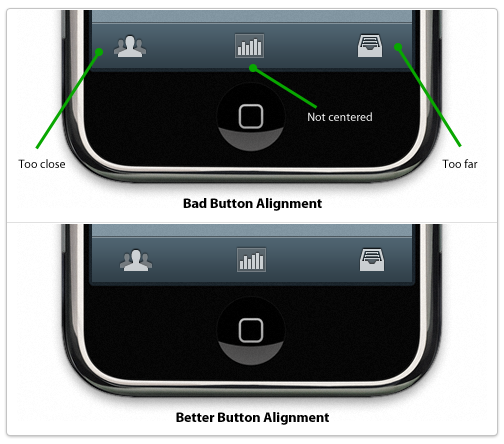
Mike Rundle explores the pros and cons of design critique on Dribble, and where design execution can go wrong. Mind that kerning!
Your Design Is Wrong (And Here's Why) ~ Flyosity by Mike Rundle
Showing posts with label iphone. Show all posts
App Icons on iPad and iPhone
Handy for those doing mobile application work for iPad and iPhone:
Technical Q&A QA1686: App Icons on iPad and iPhone
Designing for the iPhone and iPad - A Collection of Pre-Built GUI Kits
If you are developing interfaces for the iPhone or iPad and are looking for pre-build GUI resources, check out this comprehensive collection from Speckyboy:
Mobile Interface Development Tools for Android, iPhone, iPad, Palm Pre
This is a great collection of on and offline tools for developing interfaces for mobile devices, including a Photoshop file for iPad applications. Enjoy!
Mobile Interface Development: Ultimate GUI Toolbox for Android, iPhone, iPad, Palm Pre | Coding | PelFusion.com
hat tip: InspiredMag and PelFusion.com
shared via AddThis.com
Share any page from Safari on your iPhone with AddThis
As you might have guessed, I love to share interesting things I come across using AddThis. If I'm using my laptop or desktop mac, I can use AddThis for Firefox (or IE or Chrome or even a bookmarklet.)
If I'm using my iPhone, it's not as easy. If that website uses AddThis, no problem, I can use the handy iphone-optimized sharing menu. But if that site doesn't use AddThis yet, I have to use Safari's email-link feature. Not optimal.
Here's a bit of a hack that makes AddThis sharing easy from any page in Safari for iPhone. These instructions will create a sharing "bookmarklet" for iPhone Safari – basically Javascript that looks and acts like a bookmark:
Now, when you want to share a page, just open the bookmarks menu in Safari on your iPhone, select your new Share bookmarklet, and instead of navigating to another page Safari will execute the Javascript and share the page using AddThis.
Big hat tip to my partner in crime Jeff Wong for this tip.
If I'm using my iPhone, it's not as easy. If that website uses AddThis, no problem, I can use the handy iphone-optimized sharing menu. But if that site doesn't use AddThis yet, I have to use Safari's email-link feature. Not optimal.
Here's a bit of a hack that makes AddThis sharing easy from any page in Safari for iPhone. These instructions will create a sharing "bookmarklet" for iPhone Safari – basically Javascript that looks and acts like a bookmark:
- Navigate to this page on your iPhone, and copy the Javascript below.
- Bookmark this page (or any page you like); save the bookmark wherever you'd like your bookmarklet to be.
- Open the bookmark menu on your iPhone (it's on the bottom menu in Safari, the icon that looks like an open book), navigate to the bookmark you just created, and edit it.
- Change the name of the bookmark to "Share", or whatever you'd like to call it.
- Remove the saved URL completely, and paste the copied Javascript where the URL was and save the changes.
javascript:void((function(svc)%20%7Bvar
%20d=document,w=window,p=0,b=function()%7Bif(!p)%7Bp=1;if
(w.addthis_sendto)addthis_sendto(svc%7C%7C'bkmore',
%7Bproduct:'bkm-'+_atc.ver%7D)%7Delse%7Bp=0;if(_atw)_atw.clb()%7D%7D;if
(!w._atc)%7Bvar%20ol=w.addthis_onload%7C%7C%5B%5D,o=d.createElement
('script');o.src='//s7.addthis.com/js/250/addthis_widget.js?
domready=1&username=bookmarklet';ol.push
(b);w.addthis_onload=ol;d.getElementsByTagName('body')
%5B0%5D.appendChild(o)%7Delse%20b()%7D)())
Now, when you want to share a page, just open the bookmarks menu in Safari on your iPhone, select your new Share bookmarklet, and instead of navigating to another page Safari will execute the Javascript and share the page using AddThis.
Big hat tip to my partner in crime Jeff Wong for this tip.
Top 10 Must Have iPhone Apps for Bloggers
"The web is going mobile and it is going faster than anyone can think. Majority of the bloggers are now using their iPhone or similar style phones to jot down ideas, write entire posts, stay connected and so much more. In this showcase we will be highlighting some of the most essential iPhone Apps for bloggers."
Top 10 Must Have iPhone Apps for Bloggers
Exploring iPhone App Design Trends
Jen Gordon takes a look at recent trends in iPhone app design, including:
Check it out: iPhone App Design Trends - Smashing Magazine
Shared via AddThis
- mirroring iPhone look and feel
- mimicking hardware interfaces
- layered interface elements
- illustration
- gestural interactions
Check it out: iPhone App Design Trends - Smashing Magazine
Shared via AddThis
Subscribe to:
Posts (Atom)